Customer Journey Mapping in 2026: Why Manual Methods Are Obsolete
Customer Journey Mapping in 2026: Why Manual Methods Are Obsolete
The last time you built a customer journey map, how long did it take? Two days of workshops? A week of synthesizing interview notes? And how long was that map accurate before your product shipped something that changed user behavior?
Customer journey mapping has been a staple of product and UX practice for over a decade. The core idea is sound: understand how users move through your product so you can make that experience better. The execution, though, has not kept up with how products actually work in 2026.
Products today are multi-variant, multi-device, multi-language, and constantly shipping. The average B2B SaaS company pushes code multiple times per week. Feature flags create dozens of simultaneous product versions. User segments behave in radically different ways. And yet most teams are still mapping journeys the way they did in 2015: workshops, sticky notes, and a Miro board that gets forgotten by next quarter.
This piece breaks down why manual customer journey mapping no longer works, what has replaced it, and how to transition your team to a modern approach that actually keeps up.
The State of Customer Journey Mapping Today
According to Forrester's Customer Experience Index, 89% of companies say they compete on customer experience. Yet fewer than 25% have customer journey maps that are updated more than once per year.
That gap is the problem. Companies know journey mapping matters. They just cannot keep their maps current using manual methods.
Here is what the typical journey mapping process looks like at most organizations:
- A PM or UX researcher organizes a workshop (1-2 weeks to schedule)
- Cross-functional stakeholders spend half a day reconstructing user paths from memory
- Someone synthesizes the output into a polished diagram (another week)
- The map gets presented in a few meetings, added to a wiki, and slowly forgotten
- Three months later, the product has changed enough that the map no longer reflects reality
Nielsen Norman Group's research on journey mapping emphasizes that effective maps must be living documents. The practice guidelines are solid. The challenge is operational: maintaining living documents manually does not scale when your product changes weekly.
Why 2026 Is Different
Three forces have converged to make manual customer journey mapping genuinely obsolete:
Product complexity has exploded. The median B2B SaaS product now has hundreds of distinct screens when you count modals, drawers, conditional states, and multi-step wizards. A 2024 Gartner report on digital product management found that enterprise products average 340+ unique screen states. No workshop can map all of those.
User expectations move faster than teams. Users compare your product experience to every other product they use. If your onboarding is clunky compared to the last app they tried, they notice immediately. Journey maps from last quarter cannot help you compete with expectations shaped yesterday.
AI has made automated mapping possible. Two years ago, real-time journey mapping from session data was emerging technology. Today, it is production-ready and accessible to teams of any size. The technology barrier has dropped to nearly zero.
Five Ways Manual Journey Mapping Fails
1. The Assumption Problem
Manual maps are built on what stakeholders believe users do. Even your most experienced PM is reconstructing journeys from memory, filtered through their own biases and the subset of users they have spoken with.
Research from Harvard Business School on customer behavior prediction shows that internal teams accurately predict customer behavior less than 50% of the time. When you build a map on assumptions, you codify those errors into your product strategy.
At Canva, we would occasionally validate our workshop-generated journey maps against actual usage data. The results were humbling. Paths we thought were dominant turned out to be used by a small minority. Paths we had never mapped turned out to be how most users actually completed their tasks.
2. The Freshness Problem
Products are living systems. Every deploy, every feature flag, every A/B test creates a new version of the user experience. A journey map that was accurate on Monday can be wrong by Friday.
The freshness problem compounds over time. Teams that use outdated journey maps make decisions based on outdated reality. Those decisions produce changes that make the map even more outdated. It is a decay cycle.
3. The Segmentation Problem
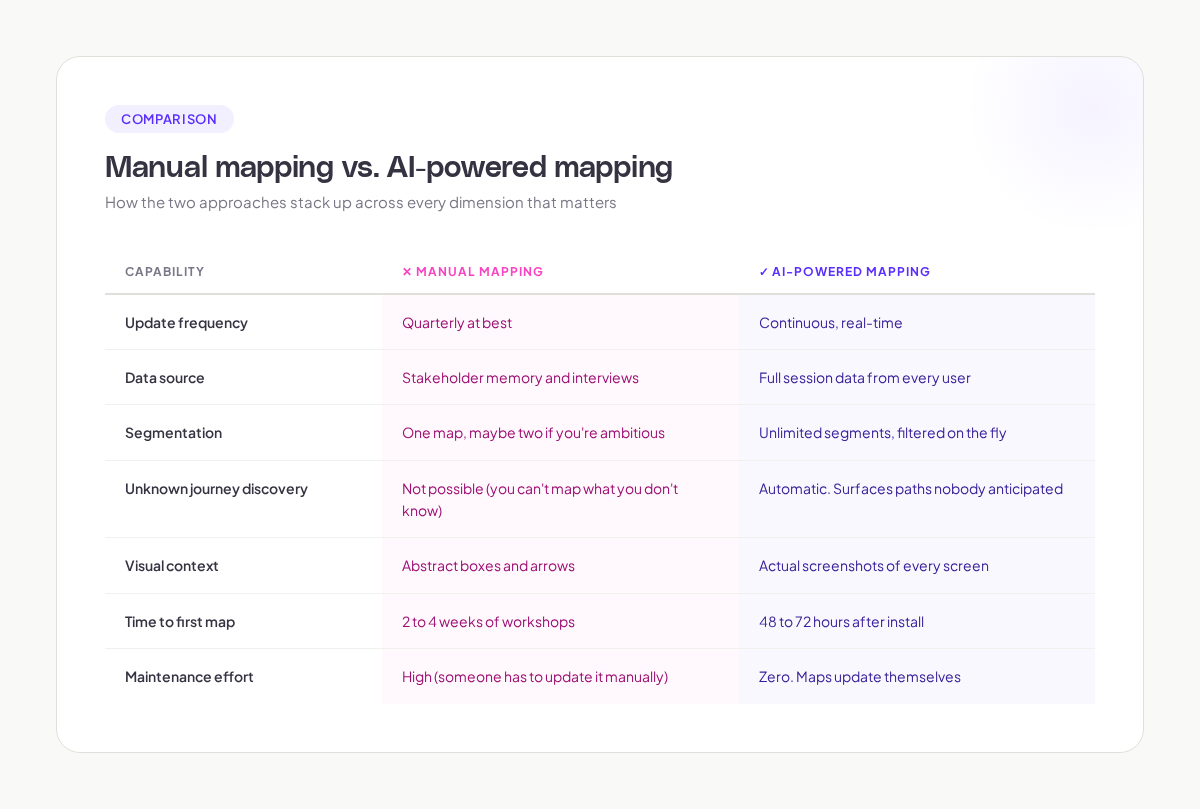
Your "average user" does not exist. Enterprise accounts navigate differently from SMBs. Mobile users take different paths from desktop users. New users explore differently from power users. Users in Japan interact differently from users in Germany.
Manual journey mapping typically produces one map, maybe two if your team is ambitious. That single map obscures the segment-specific patterns that drive your most important metrics.
McKinsey's research on customer journey personalization found that companies who understand segment-specific journeys generate 40% more revenue from those efforts compared to companies working from a single generic map.
4. The Coverage Problem
Manual mapping covers the journeys you know about. It cannot, by definition, discover the journeys you do not know about. And the most valuable insights often come from unexpected paths.
When I was running growth experiments at Canva, we discovered through data analysis that a significant number of users were using the presentation tool to create social media posts. Nobody had mapped that journey. Nobody had anticipated it. It was only visible in the behavioral data. That discovery led to product decisions that served millions of users.
5. The Collaboration Problem
A journey map on a Miro board is a reference artifact. It is not a working tool. When a designer wants to understand how users reach a specific modal, they do not pull up the journey map. They ask a PM. Or they guess.
Effective customer journey mapping needs to be embedded in how teams work, accessible in real time, and connected to the actual product data. Static diagrams fail that test.
What Modern Customer Journey Mapping Looks Like
The shift from manual to AI-powered customer journey mapping is not just a technology change. It is a workflow change.
From Workshops to Continuous Capture
Instead of periodic mapping exercises, modern tools capture user paths continuously. Every session generates journey data. The system aggregates those sessions into journey patterns automatically.
This means your journey maps are always current. They reflect what users did yesterday, not what someone remembered from a user interview three months ago.
From Assumptions to Evidence
When your journey maps are built from real session data, every node in the map is backed by actual user behavior. You can click into any point in the journey and see exactly how many users reached that screen, what they did there, and where they went next.
This changes the nature of product conversations. Instead of debating what users probably do, teams can look at what users actually do and focus their energy on deciding what to change.
From Static to Filterable
Modern customer journey mapping platforms let you slice journey data by any dimension: user cohort, device type, geographic region, subscription tier, acquisition source, date range. You can compare how different segments navigate the same journey, or how the same segment's behavior has changed over time.
From Isolated to Integrated
The best modern approaches connect journey data to the tools your team already uses. Journey friction points flow directly into your backlog. Journey changes after a deploy show up in your monitoring. Journey data answers questions in team conversations.
This integration is what turns customer journey mapping from a periodic exercise into a continuous practice. And continuous practices produce better products.
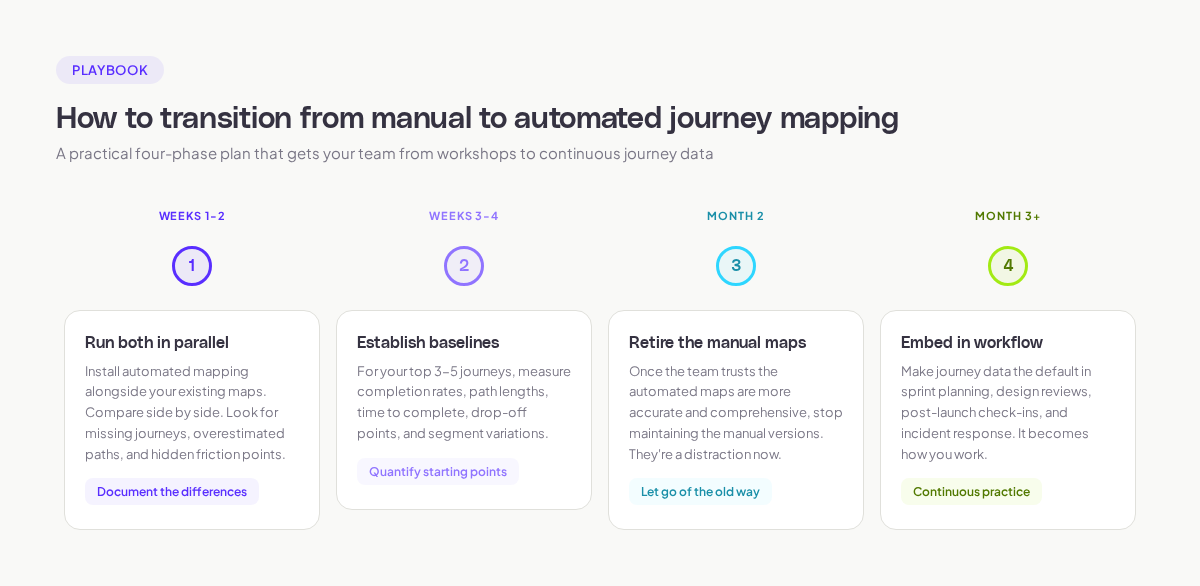
How to Transition from Manual to Automated Journey Mapping
If your team currently relies on manual journey maps, here is a practical transition plan.
Phase 1: Run Both in Parallel (Weeks 1-2)
Install an AI-powered journey mapping tool alongside your existing maps. Compare the automated output to your manual maps side by side. The differences will be revealing.
Look for three things:
- Missing journeys. Paths that real users take that are not in your manual map.
- Overestimated paths. Journeys you thought were common that turn out to be rare.
- Friction points. Specific screens or transitions where users struggle, loop, or drop off.
Document these differences. They are the strongest argument for moving to automated mapping.
Phase 2: Establish Baselines (Weeks 3-4)
For your 3-5 most important journeys, establish quantitative baselines using the automated data:
- Journey completion rate
- Average path length (number of screens/steps)
- Median time to completion
- Top drop-off points
- Segment-specific variations
These baselines give you a starting point for measuring improvement.
Phase 3: Retire the Manual Maps (Month 2)
Once your team has validated that the automated maps are accurate and more comprehensive than the manual versions, stop maintaining the manual maps. They are a distraction.
This is often the hardest step emotionally. Teams have invested time and pride in their workshop-generated maps. Letting go requires trust in the data.
Phase 4: Embed in Workflow (Month 3+)
Make automated journey maps the default reference in product discussions:
- Sprint planning: "What does the journey data say about this area?"
- Design reviews: "How do users currently navigate to this screen?"
- Post-launch reviews: "How did the journey change after we shipped this?"
- Incident response: "Did user journey patterns shift after this deploy?"
Adora's automated journey mapping was designed specifically for this workflow integration. It gives product teams a visual source of truth they can reference in any conversation, without needing to maintain it manually.
What to Look for in a Customer Journey Mapping Tool
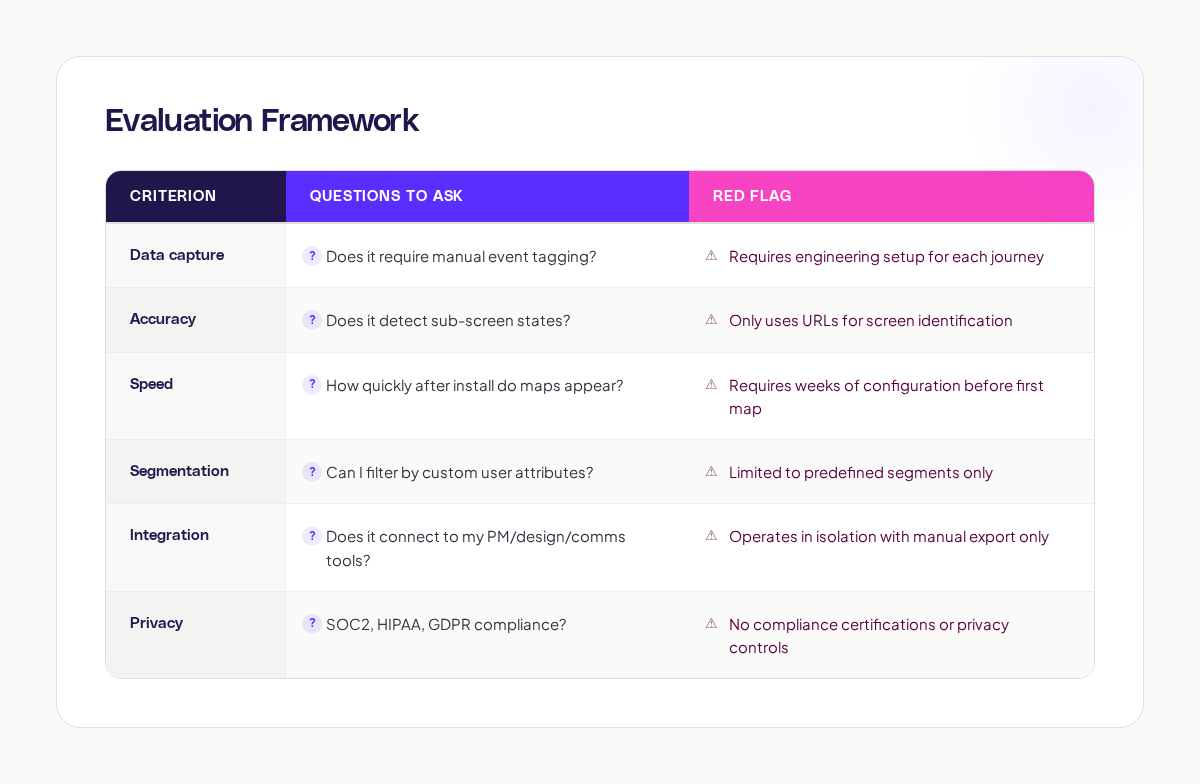
If you are evaluating tools, here is what separates the effective ones from the rest.
Non-Negotiable Features
- Auto-capture without manual event tagging. If you need to instrument events before mapping, the tool is solving last decade's problem.
- Visual screen context. Journey nodes should show actual screenshots, not just labels or URLs.
- Sub-screen detection. Modals, multi-step flows, and conditional UI on the same URL need to be captured as distinct states.
- Segment filtering. You should be able to filter journeys by any user attribute or behavioral cohort.
- Real-time data. Journey maps should reflect behavior from the last 24-48 hours, not last month.
Evaluation Framework
Common Objections
"Our product is too simple for AI journey mapping."
Even "simple" products have more journey complexity than teams realize. If your product has more than 20 screens, feature flags, or multiple user roles, you have journey complexity worth mapping.
"We already have analytics. Why do we need journey maps too?"
Analytics tells you what happened on a specific screen or event. Journey mapping tells you how users move between screens and events. They answer different questions. Google's UX research team has published extensively on how behavioral sequence data reveals insights that aggregate metrics miss.
"Our team is too small to need this."
Small teams benefit the most from automated mapping because they cannot afford to spend days in workshops. A 3-person product team gets more from automated journey data than a 30-person team gets from quarterly workshops.
"We will do this when we are bigger."
The patterns you establish early become harder to change later. Understanding your user journeys now, while your product surface area is manageable, gives you a foundation that scales with your product.
Getting started
Customer journey mapping is not going away. It is evolving. The shift from manual to automated, from periodic to continuous, from assumed to evidence-based, is happening across the industry.
In 2026, the question is not whether you should map customer journeys. It is whether you can afford to keep mapping them manually. The data says you cannot.
The technology exists to capture every journey, every screen, every decision point your users encounter, automatically and in real time. Teams at companies like Canva and Notion are already working this way. The competitive advantage of seeing your product through your users' eyes, accurately and continuously, is too significant to leave on the table.
If your journey maps are more than a month old, they are already wrong. Start fresh with real data. Your product decisions will be better for it.
Want to see what your real user journeys look like? Try Adora free and get your first automated journey maps within 48 hours.
Related posts

Why We Built AI Product Insights
The story behind Adora's AI Insights, and why I think this is the future of how product teams operate.

Data-driven off a cliff: why dashboards are dead
Dashboards are dead. Not because data doesn't matter. But because the way we've been accessing it was never actually built for the people making product decisions. Here's what went wrong, and what comes next.

SaaS Pricing Pages to Sign Up Journeys
This teardown analyzes SaaS pricing pages and their connected sign up journeys. Learn how leading SaaS companies design pricing, CTAs, and sign up flows that reduce friction and increase conversion.