How to Write Product Requirements Documents Correctly
How to Write Product Requirements Documents Correctly
I’ve read a lot of PRDs over the years.
Most of them had the same problem: by the time anyone relied on them, they were already out of date.
Not because the PM didn’t do the work. Usually the intent was right. The issue is what happens next. Between writing the doc and shipping the feature, the product changes. Designs iterate. Scope shifts. New edge cases show up. And suddenly the PRD is describing a product that doesn’t exist anymore.
That gap is expensive. The Standish Group famously found that only 29% of software projects are delivered successfully, and unclear or outdated requirements are repeatedly cited as a major contributor. Static docs just don’t keep up with teams that ship every week.
This guide is about a different approach: PRDs that stay connected to what’s actually happening in your product, so the spec reflects reality, not a snapshot.
Why traditional PRDs fail
Most PRD templates haven’t changed much in twenty years. You open a doc and fill in the usual sections. Then you circulate it, get sign-off, and move on.
The problem is what happens after kickoff.
The document stops moving, but the product keeps moving. A PRD captures a moment in time. But product development is a stream of decisions: research results, design reviews, technical discovery, tradeoffs. The Project Management Institute notes that a huge share of rework can be traced back to requirements that weren't managed well as things changed.
Screenshots and mockups go stale fast. You paste in a Figma screenshot. Three iterations later, the flow looks different, but the PRD is still showing the old version. Engineers still reference it. Stakeholders still quote it. It becomes confidently wrong.
No one wants to “maintain the doc” mid-build. Requirements do change during implementation. That is normal. What isn’t normal is expecting someone to keep a long spec up to date while they are also shipping.
Result: people make decisions based on information that used to be true.
What a useful PRD achieves
Before changing the format, it helps to be clear about the goal. The best PRDs I’ve seen aren’t the ones with the most sections. They’re the ones that stay usable when decisions are being made.
Prioritise accuracy over thoroughness
A short PRD that’s right beats a long PRD that’s half-wrong. IEEE has published research showing that the cost of a requirements mistake can multiply dramatically the later it's found. Accuracy is not a nice-to-have. It’s the point.
Stay grounded in observable reality
“Users struggle with checkout” is vague. “47% of users abandon checkout at the shipping step” is actionable. Useful requirements are anchored in what you can see, measure, and validate.
Be accessible at the moment of decision
If the PRD only gets opened in planning meetings, it is basically a planning artifact. Documentation usability research from Nielsen Norman Group points out that proximity to the work is one of the strongest predictors of whether docs get used.
Be maintainable without heroics
If keeping the PRD current requires recurring, manual effort, it will decay. A good PRD design assumes that people are busy and builds in ways to stay current anyway.
How visual intelligence changes PRDs
Visual intelligence is a simple shift: instead of describing your product in a document, you connect the document to the product.
In practice, that changes a few key things.
Live product references replace static screenshots
Rather than pasting images that freeze a moment, a visual PRD points to the actual product state. When the UI changes, the reference stays current.
With tools like Adora’s living product docs, the connection is passive. The documentation stays in sync because it is generated from the product, not rewritten every time something changes.
Behaviour data becomes part of the spec
Traditional PRDs often capture what the team thinks users need. Visual PRDs can include what users actually do.
If you can pull in evidence like session replay data and it is right there next to the requirement, your team spends less time arguing about opinions and more time solving real problems.
This is also where Adora’s Ask Adora is useful: instead of digging through dashboards, you can ask a specific question like “Where do users drop off in onboarding?” and get an answer grounded in real behaviour.
Change history becomes automatic
A connected PRD can show how requirements evolved over time: what changed, when it changed, and what the product looked like at each stage. That makes it easier to understand the current state and also learn from past decisions.
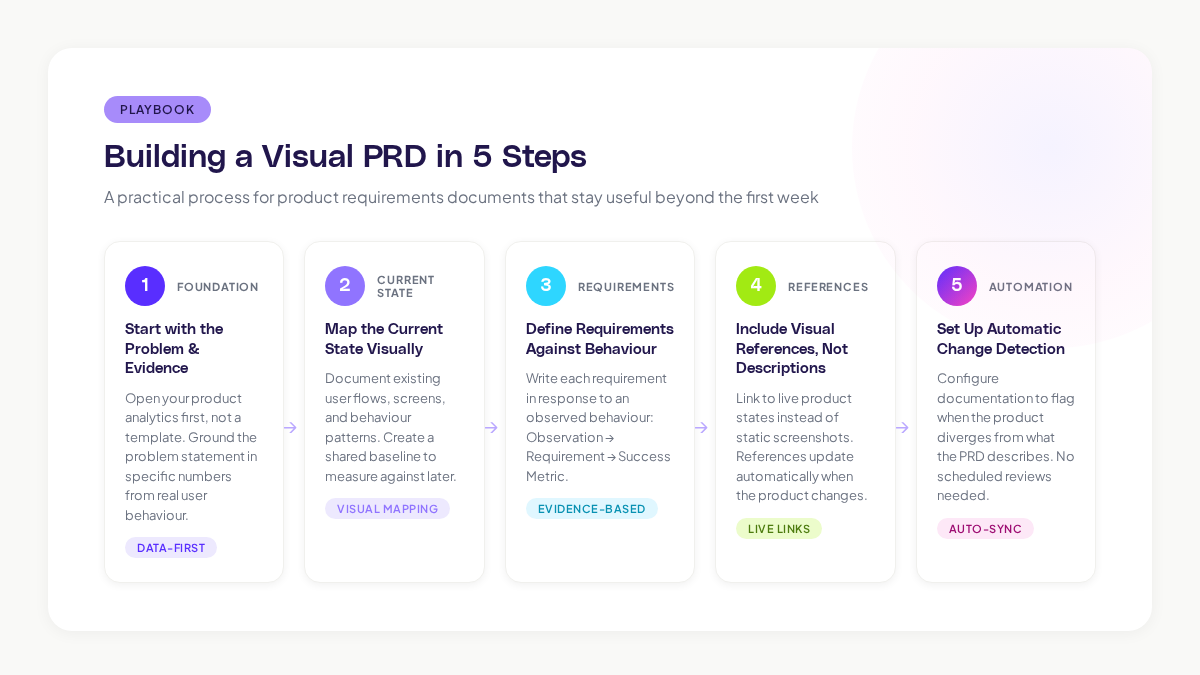
Building a visual PRD (step by step)
Here’s a practical way to create product requirements documents that stay useful past week one.
Step 1: Start with the problem and the evidence
Before you write anything, look at what is actually happening in the product. Where do users get stuck? Where do they bounce? What do your best users do differently?
Aim for a problem statement with numbers. “32% of trial users never complete setup” is a problem statement. “Users have trouble with onboarding” is a guess.
Step 2: Map the current state visually
Document where things are today: the current flow, the current screens, the current behavioural patterns. This gives the team shared context and creates a baseline you can measure against.
If you already have visual documentation, this step becomes assembly rather than creation.
Step 3: Write requirements as a response to behaviour

A simple structure that works well:
- Observation: what you saw
- Requirement: what needs to change
- Success metric: how you will know it worked
Example:
- Observation: Users spend an average of 45 seconds on the pricing page before leaving.
- Requirement: Make pricing easier to understand in under 15 seconds.
- Success metric: Bounce rate drops from 68% to under 40%.
(HBR has written about decision-making frameworks that improve outcomes when teams anchor on observed data rather than assumptions.)
Step 4: Include visual references, not long descriptions
For every key screen or flow, point to a live reference. The difference is huge:
- “See the checkout flow in Figma” (interpretation-heavy)
- “Here is the checkout flow as users experience it right now” (reality)
Step 5: Set up automatic change detection
The most important “maintenance” improvement is switching from reminders to signals.
Instead of scheduling doc reviews, set up a way to flag when the product has diverged from what the PRD describes.
PRD sections that matter (and ones you can drop)
You do not need a giant template. Keep the parts that help teams make good decisions.

Keep these
- Problem statement with data
- Success metrics that are measurable and tied to outcomes
- Requirements with rationale (and the evidence behind them)
- Current state visuals of the product
- Scope boundaries (what you are not building)
- Dependencies and risks
Cut these
- Long market analysis (save it for strategy docs or link out to a master doc)
- Detailed technical architecture (engineering should own this) and link to your architecture documentation rather than re-writing it
- Rewriting personas from scratch (link to a source instead)
- Static wireframes pasted as images (they rot)
- Feature lists without success criteria
Common PRD mistakes
1) Writing for completeness instead of usefulness
If a PRD takes more than 15 minutes to read, it often won’t be read. You can have depth, but you cannot have bloat.
Fix: Set a page limit. If you cannot describe the requirements in under two pages of actual content (excluding visuals), the scope is probably too broad.
2) Requirements with no success criteria
“Build a dashboard” is vague. “Build a dashboard that cuts weekly reporting from 4 hours to 30 minutes” is a requirement.
Fix: For every requirement, ask “How will we know this worked?” If there is no metric, it is not ready.
3) Treating the PRD as a handoff
The PRD should not be a baton you pass to engineering and never look at again.
Fix: Keep it visible during the build. Update it when discoveries happen. If the PRD is connected to the live product, it becomes much easier for the doc to evolve with the work.
4) Ending the PRD at “shipped”
Some of the most important requirements appear after launch: what changed in behaviour, what did not, and what needs iteration.
Fix: Add a post-launch section and capture expected vs. observed outcomes. McKinsey has written about the efficiency gains companies see when they systematically apply post-launch learnings.
How to improve your next PRD?
PRDs don’t fail because people are bad at writing. They fail because static documents can’t keep up with dynamic products.
If you want your PRDs to stay useful:
- Ground requirements in observed behaviour.
- Replace screenshots with live references.
- Keep it short, and keep it accurate.
- Automate maintenance so the doc stays true without manual effort.
- Measure outcomes, not output.
Want your product requirements to stay connected to your live product? Adora’s living product docs keep specs in sync with reality, without the “please update the doc” burden.
Related posts

Why We Built AI Product Insights
The story behind Adora's AI Insights, and why I think this is the future of how product teams operate.

Data-driven off a cliff: why dashboards are dead
Dashboards are dead. Not because data doesn't matter. But because the way we've been accessing it was never actually built for the people making product decisions. Here's what went wrong, and what comes next.

SaaS Pricing Pages to Sign Up Journeys
This teardown analyzes SaaS pricing pages and their connected sign up journeys. Learn how leading SaaS companies design pricing, CTAs, and sign up flows that reduce friction and increase conversion.