Product Documentation Template (Living Doc)
Product Documentation Template (Living Doc)
Every product team I've worked with has a documentation template. A Notion page, a Google Doc, a Confluence space. Neatly structured with all the right headers. Problem statement. User stories. Technical specifications. Success metrics.
And every one of those templates has the same challenge: they get filled out once and abandoned within weeks.
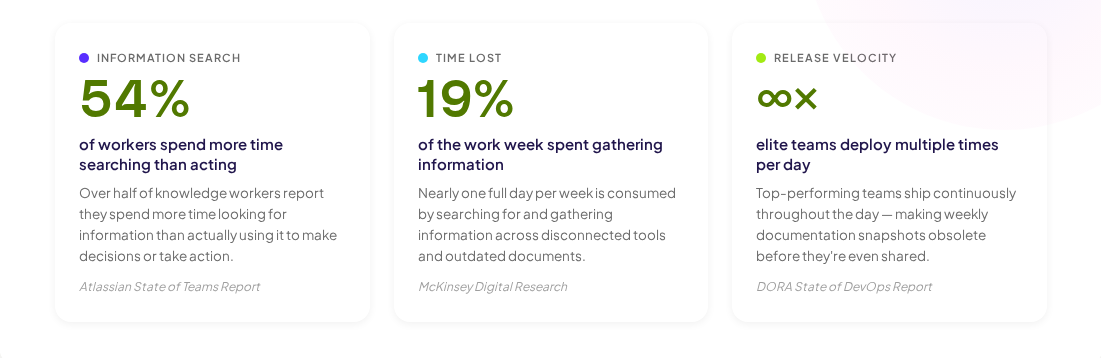
This isn't a discipline problem. Most product documentation templates are designed for the moment of creation, a checklist of sections to complete before kickoff. They're not designed for the months that follow, when the product evolves and the documentation doesn't. According to Atlassian's State of Teams report, 54% of workers say they spend more time searching for information than actually acting on it. The template that was supposed to be the single source of truth becomes just another stale document.
This guide introduces a different kind of product documentation template, one built around the principle that documentation should stay connected to the product it describes. We call it the living doc approach.
Challenges with standard PRD’s
They're designed for writing, not reading
Most templates optimise for the author's experience at creation time. They provide structure for organising thoughts and communicating plans. But the primary consumer of product documentation isn't the person who wrote it, it's the engineer checking a spec mid-sprint, the designer verifying an interaction pattern, or the new team member trying to understand how something works.
Research from the Nielsen Norman Group shows that users rarely read documentation linearly. They scan, search, and jump to specific sections. Templates designed around comprehensive authoring create documents that are hard to scan and harder to maintain.
They don't account for change
A product documentation template typically assumes the product is static or at least that someone will update the docs when things change. Neither assumption holds. Products ship continuously. Designs iterate. Requirements evolve. And nobody schedules "update the documentation" as a sprint task.
The DORA State of DevOps report consistently shows that elite engineering teams deploy multiple times per day. Documentation written against a weekly release cadence is already outdated by the afternoon.
They treat documentation as a project, not a system
Documentation has a "done" moment in most workflows: you finish the template, share it with the team, and move on. But documentation is a system, it needs inputs, maintenance, and feedback loops. A project has a start and end date. A system runs continuously.
Creating PRD’s with living product assets
A living document isn't just a document someone remembers to update. That's a maintained document and maintenance requires effort that rarely happens.
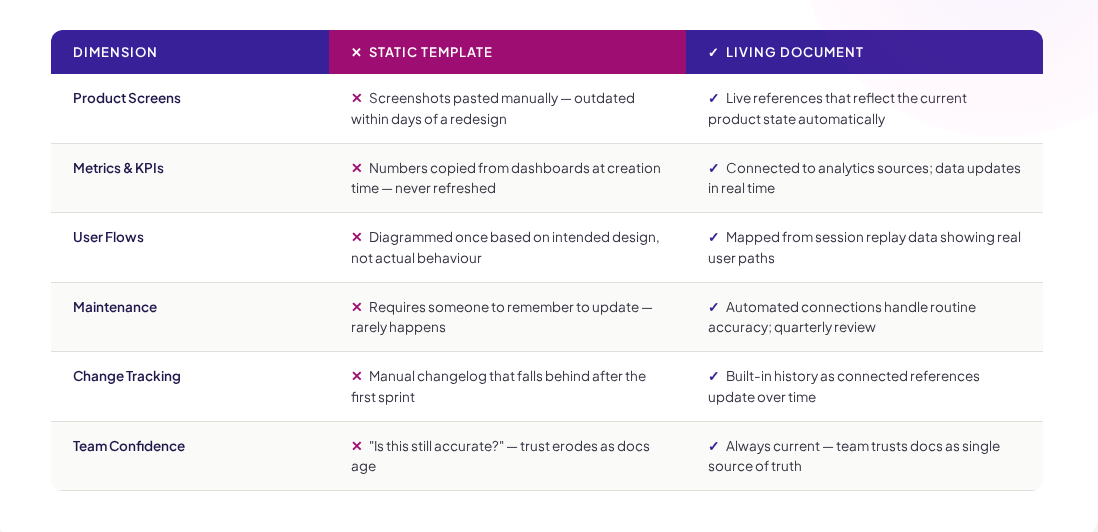
A living document is one that updates because it's connected to the product itself. When the product changes, the documentation reflects that change automatically. When user behaviour shifts, the data in the document shifts with it.
Here's the difference:
- Static template: Screenshot of the checkout flow pasted into a doc. The flow was redesigned two weeks ago. The screenshot shows the old version.
- Living doc: Reference to the actual checkout flow as it exists in the product right now. The flow was redesigned two weeks ago. The reference shows the current version automatically.
This isn't theoretical. Tools like Adora's living product docs make this connection practical your documentation pulls from the live product state, so screens, flows, and interactions stay current without manual updates.
What to include in your PRD
Every section in this product documentation template serves a specific purpose and connects to live data where possible. If a section doesn't earn its place, cut it.
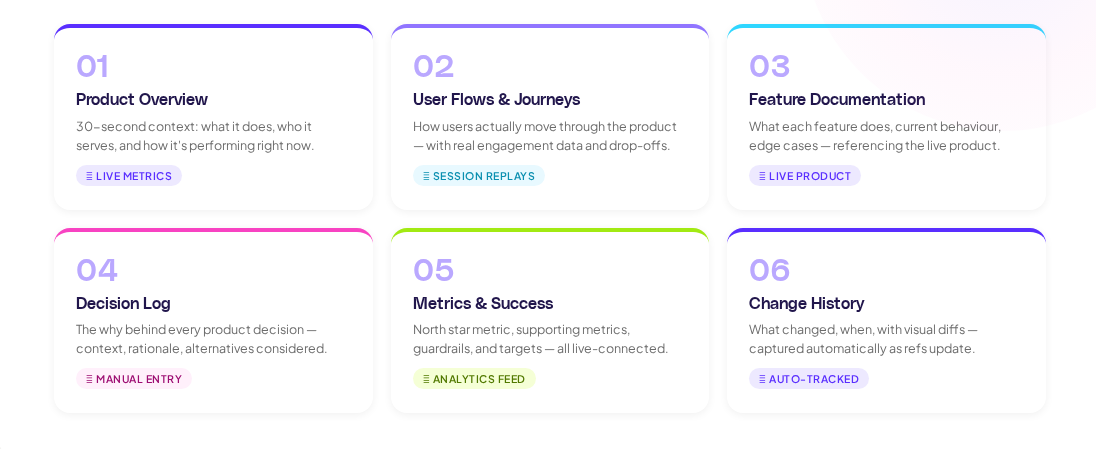
1. Product Overview
Purpose: Give anyone on the team a 30-second understanding of what this product area does, who it serves, and how it's performing.
What to include:
- One-sentence description of the product area
- Primary user segment
- Core value proposition
- Key metrics (connected to live data — not manually updated numbers)
- Link to the live product
What NOT to include: Market analysis, competitive positioning, or strategy narrative. Those belong in separate documents. The overview should be scannable in under a minute.
2. User Flows and Journey Maps
Purpose: Show how users actually move through the product, not how you designed them to move, but what the data shows.
What to include:
- Current user flows with real engagement data
- Drop-off points with specific percentages
- Key decision moments where users diverge
The best product documentation templates connect this section to actual analytics. If your session replay data shows that 34% of users skip the tutorial, that's documented here — not in a separate analytics report that nobody cross-references.
3. Feature Documentation
Purpose: Describe what each feature does, how it works, and why it exists. This is the section engineers and designers reference most.
What to include:
- Feature name and status (live, in development, deprecated)
- Current behaviour (connected to live product state where possible)
- Acceptance criteria and edge cases
- Known issues or constraints
Critical rule: Feature documentation should reference the live product, not describe it from memory. If the feature has changed since documentation was written, the documentation should reflect the change automatically.
4. Decision Log
Purpose: Capture the why behind product decisions so future team members understand context, not just outcomes.
What to include:
- Decision date
- Decision made (concise statement)
- Context and rationale (what information drove the decision)
- Alternatives considered
- Who made the decision
This section is the most manually maintained, but it's also the most valuable for institutional memory. According to research from Carnegie Mellon's Software Engineering Institute, architectural decision records are one of the highest-leverage documentation practices — they prevent teams from re-litigating settled decisions and help new members understand trade-offs.
5. Metrics and Success Criteria
Purpose: Define how you measure whether this product area is succeeding — and show current performance.
What to include:
- North star metric with current value (live-connected)
- Supporting metrics with trends
- Guardrail metrics (things that shouldn't get worse)
- Targets and actuals comparison
This section loses all value the moment its numbers go stale. Connect it to your analytics source so the data updates automatically. A metrics section with numbers from last quarter is worse than no metrics section at all — it creates false confidence.
6. Change history
Purpose: Track what changed, when, and what the product looked like before and after.
What to include:
- Chronological list of significant changes
- Visual diffs (before/after product states)
- Impact on metrics (if measurable)
In a living doc approach, change history is captured automatically as the connected product references update. You get a built-in record of evolution without anyone maintaining a changelog.
Using the template
Setting up a living documentation system requires some upfront investment. Here's the practical process.
Start with one product area
Don't try to document everything at once. Pick the product area that causes the most confusion — the one where people keep asking questions that documentation should answer. Document that area using the living doc template, prove the value, then expand.
Connect to your data sources
The value of a living document comes from its connections. Set up live references to:
- Product screens and flows (via visual documentation tools)
- Analytics data (key metrics, user flows, engagement data)
- Design files (current designs, not archived versions)
Research from McKinsey shows that knowledge workers spend 19% of their time searching for and gathering information. Connected documentation reduces this dramatically.
Define update triggers
Not everything updates automatically. For sections like the decision log, define clear triggers: "Every time we ship a feature change, the PM adds a decision log entry." Make it part of the definition of done, not a separate documentation task.
Review quarterly, not weekly
A living document doesn't need constant human review because the live connections handle routine accuracy. Schedule a quarterly review to:
- Archive deprecated features
- Update strategy-level context
- Validate that the template sections still earn their place
- Remove anything no longer relevant
When to use this template
This product documentation template works best for:
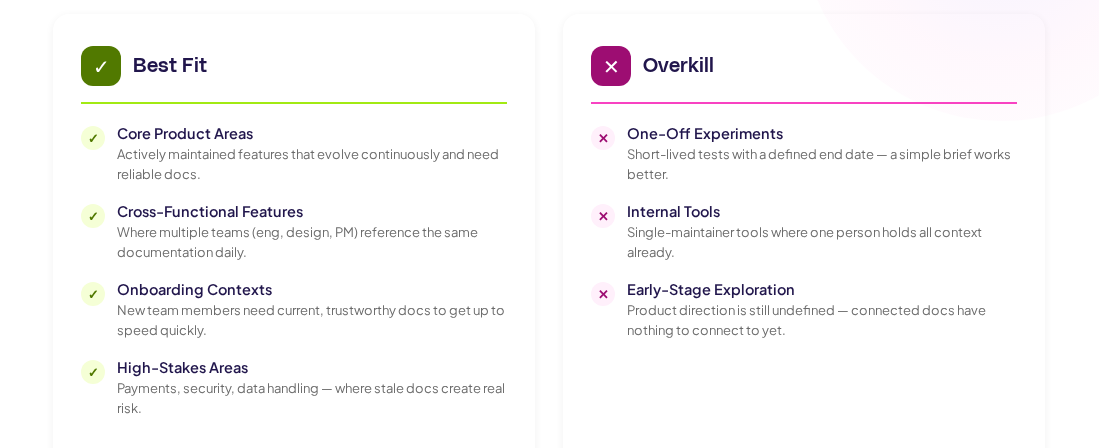
- Core product areas that are actively maintained and evolving
- Cross-functional features where multiple teams reference the same documentation
- Onboarding contexts where new team members need to get up to speed quickly
- High-stakes areas where stale documentation creates real risk (payments, security, data handling)
It's overkill for:
- One-off experiments with a defined end date — use a simple experiment brief instead
- Internal tools with a single maintainer who holds all context
- Early-stage exploration where the product direction is still undefined
Common mistakes
Trying to template everything
The living doc approach requires connected data sources and maintenance infrastructure. Applying it to every document in your organisation creates overhead without proportional value. Be selective. The Pareto principle applies: 20% of your product areas generate 80% of the documentation questions.
Not connecting to live data
A "living doc" template that's manually maintained is just a regular template with an aspirational name. The entire value proposition depends on automated connections to the product state. If you're not connecting to live data, you're not doing living docs — you're doing documentation with good intentions.
Treating docs as a side project
Product documentation deserves the same attention as product development. The teams at Canva and Replit that use Adora treat documentation as a core workflow, not an afterthought. When documentation is woven into the product development process rather than bolted on at the end, it stays relevant because it's part of how the team works.
Key Takeaways
Product documentation templates fail when they're designed for a single moment — the moment of creation. The living doc approach solves this by connecting documentation to the product itself.
- Choose sections that earn their place. Every section should answer a question the team actually asks. If nobody references a section, cut it.
- Connect to live data wherever possible. Static numbers and screenshots decay immediately. Live references stay current automatically.
- Start small and prove value. Document one product area well before scaling. A single excellent living doc is worth more than twenty stale templates.
- Make documentation part of the workflow, not a separate task. If updating docs requires a dedicated effort, it won't happen consistently.
- Review quarterly, not weekly. Living connections handle day-to-day accuracy. Human review should focus on strategic relevance, not factual updates.
Ready to turn your product documentation into living documents? See how Adora's living product docs keep your documentation connected to your live product — automatically.
Related posts

Why We Built AI Product Insights
The story behind Adora's AI Insights, and why I think this is the future of how product teams operate.

Data-driven off a cliff: why dashboards are dead
Dashboards are dead. Not because data doesn't matter. But because the way we've been accessing it was never actually built for the people making product decisions. Here's what went wrong, and what comes next.

SaaS Pricing Pages to Sign Up Journeys
This teardown analyzes SaaS pricing pages and their connected sign up journeys. Learn how leading SaaS companies design pricing, CTAs, and sign up flows that reduce friction and increase conversion.