Product Feedback Analysis with AI: From Noise to Signal
Product Feedback Analysis with AI: From Noise to Signal
Your product team has more feedback than it knows what to do with. Support tickets, NPS responses, in-app surveys, user interviews, sales call notes, social media mentions, G2 reviews. It's everywhere. And most of it sits unread in spreadsheets and Slack channels, slowly going stale.
The problem isn't collecting feedback. Most product teams have that covered. The problem is analysis. A Harvard Report found bad data cost the US alone $3.1 Trillion.
This guide shows you how to use AI to turn raw product feedback into prioritised, actionable signals. Not the "magical AI solves everything" version. The practical version, where AI handles the heavy lifting of sorting and pattern-finding, and your team focuses on the decisions that actually matter.
Where manual feedback collation breaks
Manual product feedback analysis worked when you had 50 users and one feedback channel. It doesn't work when you have 5,000 users and feedback arriving from nine different sources.
Here's where it breaks:
Volume overwhelms the team. When you receive 200 support tickets, 50 NPS responses, and 30 feature requests per week, nobody can read them all. So people skim. And when you skim, you miss the subtle patterns that actually matter.
Recency bias takes over. The feedback that gets attention is the feedback that arrived most recently, or the feedback from the loudest customer. Behavioural economics research from Kahneman and Tversky shows that humans systematically overweight recent and vivid information. Your product roadmap shouldn't be driven by whoever complained last.
Feedback silos form. Support sees one slice. Sales sees another. Product sees a third. Nobody has the full picture because the data lives in different tools, written in different formats, by different people with different contexts.
Tagging is inconsistent. If your team manually tags feedback, you'll find that "billing issue," "payment problem," "subscription bug," and "can't upgrade" are all the same thing, but they're scattered across four categories because four different people tagged them.
How AI can support with analysis
Let's be clear about where AI helps and where it doesn't.
AI is excellent at:
Clustering similar feedback across sources and formats. Whether a user describes a problem in a support ticket, an NPS comment, or a social media post, AI can recognise that they're talking about the same thing. This is the single biggest time-saver.
Identifying sentiment patterns over time. Not just "this feedback is positive/negative" but "sentiment around the onboarding experience has shifted from positive to negative over the last 6 weeks." That trend is something a human would miss until it became a crisis.
Extracting themes from unstructured text. Free-form feedback is messy. AI can pull out the core request or complaint without requiring users to fill in structured forms that nobody likes completing.
Prioritising by frequency and impact. When 200 users mention the same pain point in different words, AI surfaces that as a single high-priority theme rather than 200 isolated comments.
AI is not good at:
Understanding business context. AI doesn't know that your enterprise customer paying $50K/year matters more to your business than 100 free-tier users, unless you tell it. Always weight feedback analysis with business context.
Detecting sarcasm and nuance in small samples. A single sarcastic review can throw off sentiment analysis. AI works best on larger datasets where noise averages out.
Making product decisions. AI surfaces patterns. Humans decide what to do about them. Never let an algorithm set your roadmap.
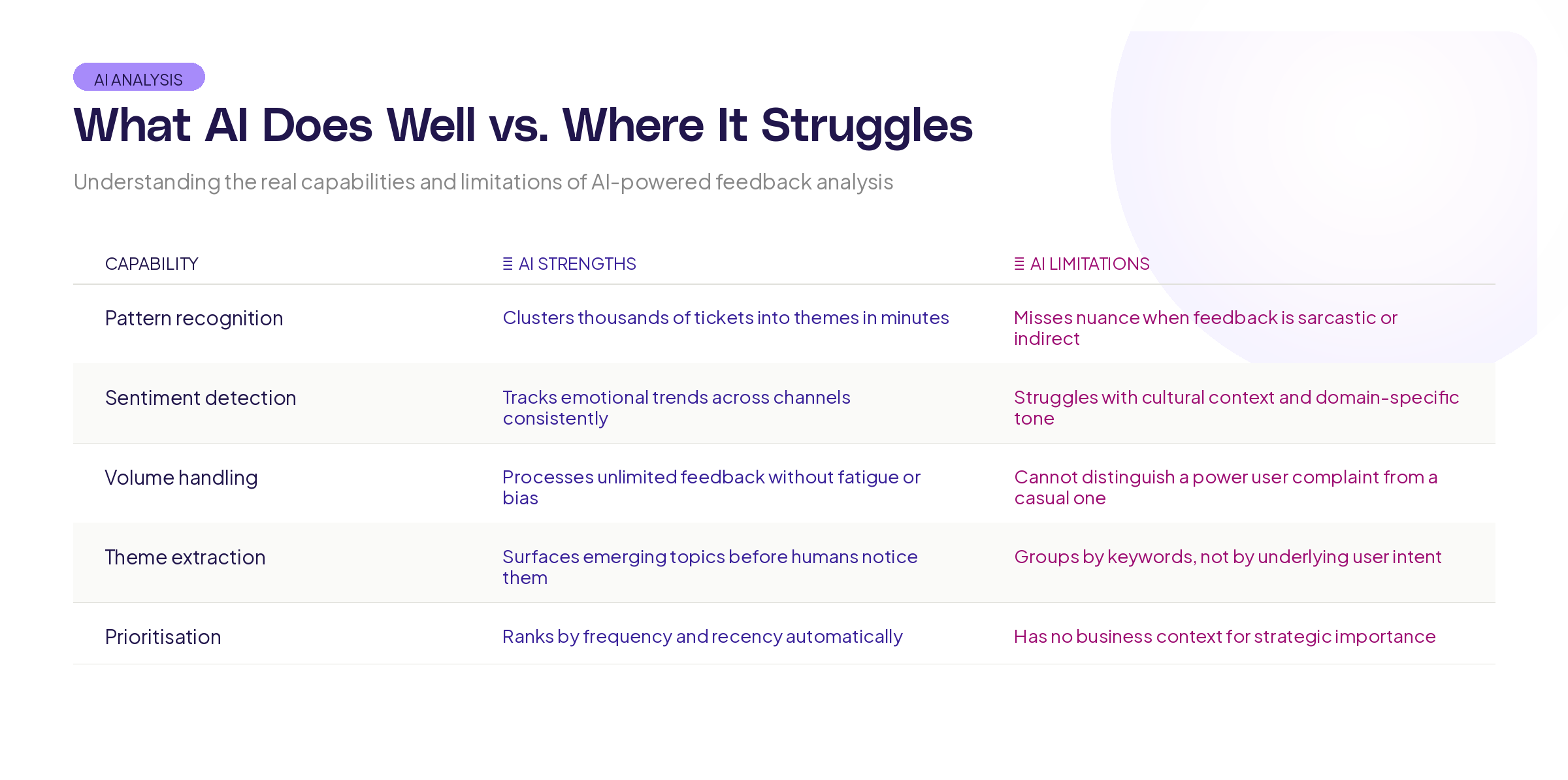
Framework for AI-Powered Feedback Analysis
Here's a step-by-step process your team can implement this month.
Step 1: Consolidate your feedback sources
Before AI can help, you need all your feedback in one place. This doesn't mean one tool (though that helps). It means one pipeline.
Map every source where feedback arrives: support system, NPS tool, in-app surveys, sales CRM notes, review sites, social media, community forums. For each source, create an automated export or integration that funnels feedback into a single repository.
The format doesn't matter much at this stage. What matters is completeness. If you're missing a source, you're missing a signal.
Step 2: Clean and normalise the data
Raw feedback is messy. Before running any AI analysis, do a basic clean-up:
Remove duplicates (the same user submitting the same issue through multiple channels). Strip out purely logistical messages ("thanks for getting back to me"). Standardise date formats and user identifiers so you can track feedback over time.
This step is boring but critical. Research from IBM estimates that poor data quality costs businesses $3.1 trillion annually. Garbage in, garbage out applies to feedback analysis just as much as anywhere else.
Step 3: Run automated clustering
This is where AI earns its keep. Feed your consolidated, cleaned feedback through an AI clustering tool. The goal is to group related feedback into themes automatically.
Good AI clustering will take "The checkout flow is confusing," "I couldn't figure out how to pay," "Your payment page needs work," and "Took me 10 minutes to find the buy button" and recognise they're all the same theme: checkout friction.
Review the clusters manually. AI will get most of them right, but you'll need to merge some, split others, and occasionally recategorise outliers. This human-in-the-loop step takes 30 minutes per week and dramatically improves accuracy.
Step 4: Score themes by frequency, sentiment, and business impact
For each cluster, calculate:
Frequency: How many users mentioned this theme? More mentions means more users are affected.
Sentiment trajectory: Is sentiment around this theme getting better or worse over time? A theme with declining sentiment is more urgent than one that's stable.
Business impact: Weight the feedback by customer segment, contract value, or churn risk. A pain point affecting your top 10 accounts is more urgent than one affecting your free tier, even if fewer people mention it.
Combine these into a priority score. The specific formula matters less than the fact that you're using multiple dimensions rather than just counting votes.
Step 5: Turn themes into actionable briefs
A feedback theme isn't a product requirement. It's a signal that needs interpretation.
For each high-priority theme, write a brief that includes: the core user problem (in their words, not yours), the number of users affected, representative quotes (3-5 that capture different angles), the business impact estimate, and potential solutions (but don't commit to one yet).
This brief is what goes to your roadmap planning process. It's specific enough to act on, but open enough to allow creative solutions.
At Adora, Ask Adora takes a similar approach. Instead of requiring teams to dig through dashboards and raw data, it lets you ask questions about your product data in plain language and get answers that connect user behaviour to specific outcomes. The principle is the same: reduce the time between question and insight.
Measuring whether your feedback analysis is working
Implementing AI-powered feedback analysis is step one. Knowing whether it's actually working is step two.
Track these metrics:
Time from feedback to roadmap item. How many days pass between a user reporting a problem and that problem appearing on your roadmap? If this number is shrinking, your analysis pipeline is working.
Theme coverage. What percentage of incoming feedback gets classified into a theme? If a large chunk lands in "unclassified," your clustering needs tuning.
Prediction accuracy. When you ship a feature to address a feedback theme, does satisfaction with that area actually improve? If not, either the feedback was misinterpreted or the solution missed the mark. The PDMA (Product Development and Management Association) has published extensive research on linking customer feedback to successful product outcomes.
Team confidence. Survey your product team quarterly: do they feel they have a clear picture of what users need? The whole point of this system is to turn noise into clarity. If the team doesn't feel more informed, something is broken.
Traps to avoid
Over-indexing on volume. The most frequently mentioned feedback isn't always the most important. A small number of users describing a data security concern is more urgent than a large number requesting a dark mode. Use business impact weighting to balance frequency against severity.
Treating AI outputs as ground truth. AI clustering is a starting point, not a final answer. Always have a human review the themes before they influence decisions. The Association for Computing Machinery has published guidelines on responsible AI use in decision-making that stress the importance of human oversight.
Ignoring qualitative context. Numbers tell you what's happening. Individual user stories tell you why. Don't let the efficiency of AI-powered analysis crowd out the empathy that comes from reading individual feedback. Set aside time each week to read 20-30 raw feedback items, unfiltered.
Analysis paralysis. The goal isn't a perfect feedback system. It's a better one than what you have today. Ship a basic version of this pipeline, measure the results, and iterate. A 70% accurate system running today beats a 95% accurate system that's still being designed.
Key takeaways
Product feedback analysis is a solvable problem, but it requires moving beyond manual tagging and spreadsheet reviews. Here's the summary:
Consolidate all feedback sources into one pipeline. You can't analyse what you can't see.
Use AI for clustering, sentiment tracking, and pattern detection. It handles volume better than humans. Use humans for context, weighting, and decisions.
Score themes by frequency, sentiment trajectory, and business impact. Don't let the loudest voice set the roadmap.
Turn themes into actionable briefs, not just lists. A good brief connects the user problem to business impact and leaves room for creative solutions.
Want to ask questions about your product data in plain language and get clear answers? Try Adora free and see how prompt-driven product intelligence turns feedback into action.
Related posts

Why We Built AI Product Insights
The story behind Adora's AI Insights, and why I think this is the future of how product teams operate.

Data-driven off a cliff: why dashboards are dead
Dashboards are dead. Not because data doesn't matter. But because the way we've been accessing it was never actually built for the people making product decisions. Here's what went wrong, and what comes next.

SaaS Pricing Pages to Sign Up Journeys
This teardown analyzes SaaS pricing pages and their connected sign up journeys. Learn how leading SaaS companies design pricing, CTAs, and sign up flows that reduce friction and increase conversion.