Product Release Communication: Keep Users in the Loop
Product Release Communication: Keep Users in the Loop
Product Update Communication: Keep Users in the Loop
You shipped a feature your team spent three months building. You wrote an update about it. Nobody read it.
This happens more than most product teams want to admit. Research from Pendo shows that the average SaaS product ships 10-15 updates per month, but fewer than 5% of users ever engage with release notes. That's not a writing problem. It's a communication design problem.
This guide breaks down how to build product update communication that actually reaches your users, gets read, and drives adoption. You'll get practical templates, timing strategies, and a framework for deciding what deserves an update in the first place.
Why Most Product Updates Fail
The biggest mistake product teams make with updates is treating every change the same way. A bug fix, a new integration, and a complete workflow redesign all get the same treatment: a line item in a changelog that nobody opens.
The problem isn't that users don't care about your product. They do. They're just overwhelmed. The average knowledge worker uses 9.4 SaaS applications daily, and every single one of them is sending updates. Your changelog is competing with hundreds of other notifications.
Here's what actually breaks product update communication:
Wrong channel for the message. A major workflow change buried in a monthly email digest won't land. A minor bug fix pushed as an in-app modal will annoy people.
No clear benefit to the reader. "We updated the settings page" tells users nothing about why they should care. "You can now invite teammates in two clicks instead of five" tells them exactly what changed for them.
Bad timing. Sending a feature announcement on Friday afternoon means it's forgotten by Monday. Sending it when the user is actively using the relevant part of your product means they might actually try it.
The Update Hierarchy: Not Everything Deserves the Same Treatment
Before you write a single word, categorise your update. This framework saves you from over-communicating small changes and under-communicating big ones.
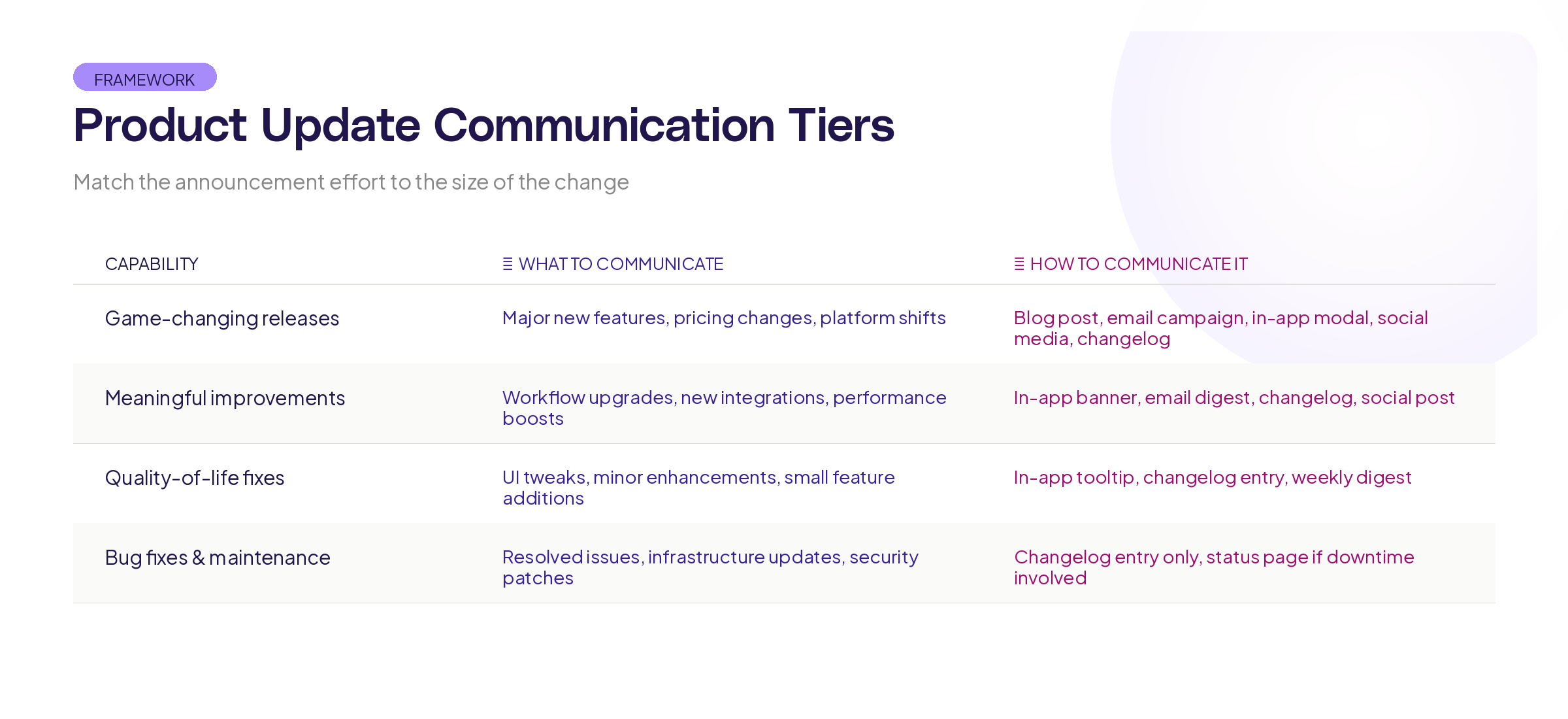
Tier 1: Game-changing releases. New product capabilities, major redesigns, or features your users have been requesting for months. These get the full treatment: in-app announcement, email, blog post, and social media. Maybe 2-4 per quarter.
Tier 2: Meaningful improvements. New integrations, significant UX improvements, workflow additions. These get an in-app tooltip or banner plus an email mention. Maybe 4-8 per month.
Tier 3: Quality-of-life fixes. Performance improvements, small UI tweaks, minor feature enhancements. These go in your changelog and maybe a monthly roundup email. Many per month.
Tier 4: Bug fixes and maintenance. Unless the bug was widely reported or visible, these just go in the changelog. Users don't need to know you fixed a race condition in your backend queue.
The key insight: if you treat everything as Tier 1, users start ignoring all of your communication. Save the big announcements for changes that genuinely matter.
Writing Updates That Get Read
The formula is simple: lead with the benefit, explain the change, show it in action.
Here's what this looks like in practice:
Bad: "We've released version 3.2.1 of our dashboard module with updated data visualisation capabilities and improved rendering performance."
Good: "Your dashboards now load 3x faster, and you can filter any chart by date range with a single click. Here's how."
Notice the difference. The first version talks about what the team did. The second talks about what changed for the user.
Structure for any update
- One sentence on what changed for the user. Not what the team shipped. What the user can now do that they couldn't before.
- A short explanation of why it matters. Connect it to a real workflow or pain point.
- A screenshot, GIF, or short video showing the change in context. Visual proof beats paragraphs of description every time.
- A clear call to action. "Try it now" with a direct link to the feature. Don't make users hunt for it.
Tone that works
Write like you're telling a colleague about something useful, not like you're writing a press release. Skip the marketing language. Nielsen Norman Group research on content comprehension consistently shows that users scan rather than read, so front-load the important stuff.
Use contractions. Say "you'll" not "you will." Say "we fixed" not "a fix has been implemented." Write the way your support team talks to users, because that's the voice people trust.
Choosing the Right Channel
The channel matters as much as the message. Here's how to match updates to the right delivery method.
In-app messages work best for contextual updates. If you changed something in the settings page, show the update when the user visits settings. Research from Intercom shows that contextual in-app messages get 3-4x higher engagement than broadcast announcements.
Email works for Tier 1 and Tier 2 updates that affect most users. Keep it short. One update per email performs better than monthly digest emails with 15 items. If you must do a roundup, put the most important change in the subject line and above the fold.
Changelog pages are your source of truth. Every change goes here, no matter how small. The people who check changelogs regularly are your power users and developers. They want detail, completeness, and technical accuracy.
In-product banners work for time-sensitive announcements: upcoming breaking changes, migration deadlines, or major launches. Use them sparingly. If there's always a banner at the top of your app, users will learn to ignore it.
Social media and blog posts work for Tier 1 announcements that you want prospects and the broader market to see, not just current users.
Timing Your Updates
When you send an update matters almost as much as what you say.
Best days for product updates: Tuesday through Thursday. Mailchimp's send-time data consistently shows higher open rates on these days for B2B content. Monday is inbox-clearing day. Friday is mentally-checked-out day.
Best time for in-app messages: When the user is actively in a relevant part of your product. If you redesigned your reporting dashboard, trigger the update when someone navigates to reports. Not when they're in the middle of an unrelated task.
Best cadence for changelog updates: As they ship. Don't batch them. Your power users want to know what changed and when. Batching updates into a weekly digest makes it harder to identify which change caused a specific behaviour they noticed.
For breaking changes or migrations: Give users at least 30 days' notice, with reminders at 14 days, 7 days, and 1 day before the change. Stripe is the gold standard here. They give generous timelines and provide clear migration guides alongside every breaking change.
Building a Living Update System
The best product update communication isn't a one-off task. It's a system that runs every time your team ships.
Here's a practical workflow:
Step 1: Categorise during planning. When a feature or fix enters your sprint, assign it a tier (1-4). This takes 30 seconds and saves hours of debate later about "how big should we make this announcement."
Step 2: Write the update before you ship. This forces clarity. If you can't explain the change in one sentence, the feature might not be well-defined enough to ship. Writing the update is a quality check on the work itself.
Step 3: Route to the right channels automatically. Tier 1 triggers the full pipeline. Tier 4 goes straight to the changelog. Set up templates for each tier so your team isn't reinventing the format every time.
Step 4: Measure what lands. Track open rates, click-through rates, and feature adoption after each update. If a Tier 1 announcement drives zero adoption, either the feature missed the mark or the communication did. Both are worth investigating.
At Adora, we built living product docs partly because we saw how many teams struggle to keep their documentation in sync with what they're shipping. When your product documentation updates itself as the product changes, you remove one of the biggest gaps in update communication: stale help docs that contradict your latest release notes.
Common Mistakes That Kill Update Engagement
Writing for other product managers, not for users. Your update audience is the person using your product to do their job. They don't care about your tech stack, your sprint structure, or your roadmap philosophy. They care about what just changed and whether it helps them.
Burying the lead. The most important information should be in the first sentence, not the last paragraph. Users scan. If the benefit isn't immediately visible, they'll move on.
No visual proof. A screenshot or 10-second GIF is worth 500 words of description. Show the change. Don't just describe it.
Inconsistent cadence. If you send updates sporadically, users stop expecting them. If you send them too frequently, users start filtering them. Find a rhythm and stick to it. Most successful SaaS companies land somewhere between weekly and bi-weekly for email updates, with continuous changelog updates.
Forgetting about onboarding. New users who signed up after your big feature launch never saw the announcement. Build a system that introduces relevant features to users based on where they are in their journey, not just when the feature shipped. This is where journey-aware communication becomes valuable, because the right update at the right moment in someone's product experience lands completely differently than a broadcast blast.
Key Takeaways
Product update communication doesn't need to be complicated, but it does need to be intentional. Here's what to remember:
Not every update deserves the same treatment. Use the four-tier hierarchy to match your message to the right channels and effort level.
Lead with the user benefit, not the feature name. Tell people what changed for them, not what your team built.
Timing and channel matter as much as the words. A well-written update in the wrong channel at the wrong time still gets ignored.
Build a system, not a one-off process. Categorise updates during planning, write them before you ship, route them automatically, and measure what works.
Want to see how your users actually experience your product updates? Try Adora free and watch real user journeys through your latest releases.
Related posts

Why We Built AI Product Insights
The story behind Adora's AI Insights, and why I think this is the future of how product teams operate.

Data-driven off a cliff: why dashboards are dead
Dashboards are dead. Not because data doesn't matter. But because the way we've been accessing it was never actually built for the people making product decisions. Here's what went wrong, and what comes next.
SaaS Pricing Pages to Sign Up Journeys
This teardown analyzes SaaS pricing pages and their connected sign up journeys. Learn how leading SaaS companies design pricing, CTAs, and sign up flows that reduce friction and increase conversion.