Web analytics tools comparison for product teams in 2026
Web analytics tools comparison for product teams in 2026
Web analytics tools comparison for product teams in 2026
You've got a real problem on your hands. Your team's drowning in clickstream data, but you don't actually know what your users are doing. You're staring at bounce rates and session duration, wondering what any of it means. You need a web analytics tool, but now you're faced with dozens of options, all claiming to be the one you need.
The web analytics tools market is massive and growing fast. According to recent market research, the industry is valued at 7.36 billion USD in 2026 and expanding at roughly 17% annually. Your choice of tool matters because it shapes how your entire team understands user behavior. Pick wrong, and you're paying for features you'll never use or struggling with tools that don't fit your workflow.
This comparison covers the tools your product team is actually considering. I'm breaking down Google Analytics, Mixpanel, Amplitude, Heap, PostHog, and others, showing you exactly what each does well, where it falls short, and who it's built for.
The difference between web analytics and product analytics
Let me start with something important: these aren't the same thing. You need to know the difference.
Web analytics tools track how people arrive at your product. They answer "where did my traffic come from?" and "what's my bounce rate?" Google Analytics is the classic example. It's focused on pages viewed, referral sources, and session flow.
Product analytics tools track what people do once they're inside your product. They answer "why did users drop off here?" and "which users are likely to churn?" Mixpanel and Amplitude are built for this. The difference matters because your choice depends on what you actually need to learn.
Most teams now need both. You want to know where traffic comes from (web analytics), but you also need to understand how users interact with your features once they land (product analytics).
Google Analytics 4: still the default, but limited for product teams
Google Analytics is free. That's why most teams start here. It's ubiquitous, it integrates with every marketing tool you use, and you probably already have it installed.
GA4 brought a major shift: it moved from page-based tracking to event-based tracking. This is good news. Events are the building blocks of understanding user behavior. You can now track custom interactions, not just pageviews.
But here's the honest truth: GA4 is built for marketers and web operators, not product teams. It's great for understanding traffic sources and campaign performance. For in-product behavioral analysis, GA4 struggles because it lacks the depth and flexibility that product analytics platforms provide.
GA4 is worth using for free. Don't pay for it when product analytics is what you really need.
Mixpanel vs Amplitude: the heavyweight web analytics tools comparison
These two dominate the product analytics space for good reason. Both are built from the ground up for product teams. Both use event-based tracking. Both have excellent UI and reporting.
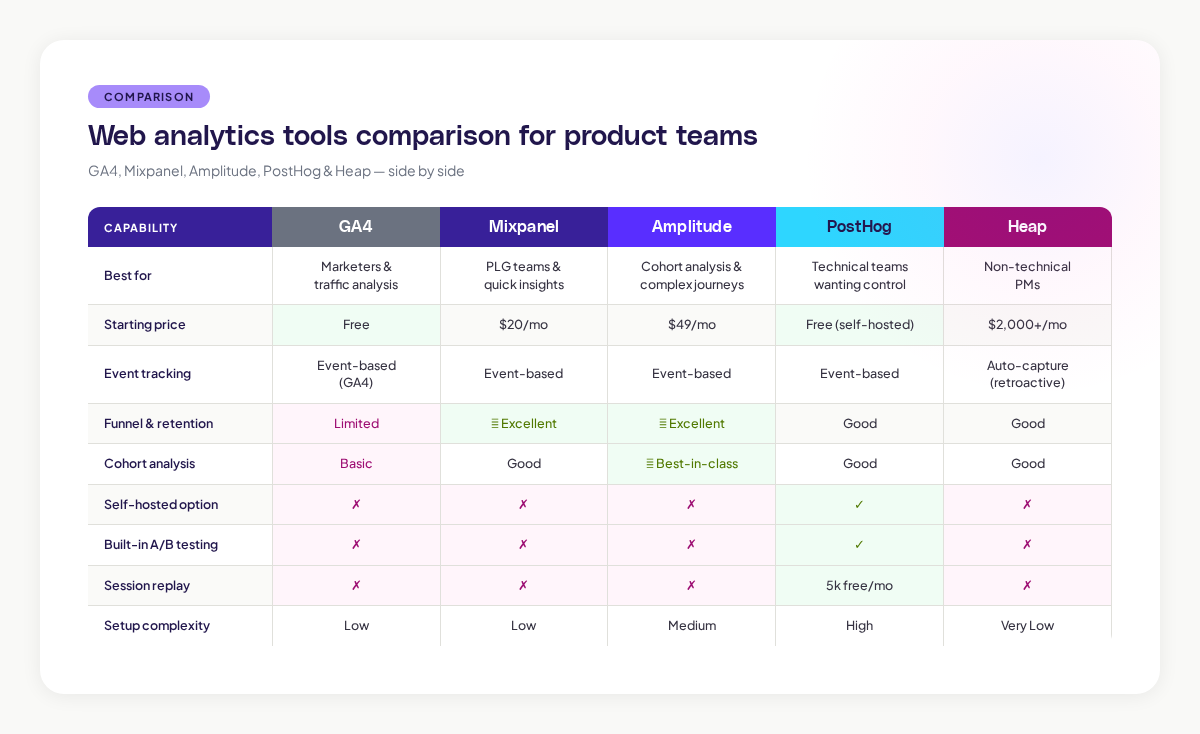
The core difference comes down to workflow and depth. Mixpanel excels at funnel tracking and retention analysis, making it a favorite for product-led growth teams. Its Flows visualization is outstanding for discovery work. Amplitude leans into cohort analysis and multi-path journeys.
For pricing, Mixpanel starts at $20/month (self-serve). Amplitude begins at $49/month. But pricing scales with your event volume, so the gap tightens as you grow.
Interface matters more than you'd think. Amplitude reviewers consistently praise its intuitive design and varied chart options. Mixpanel is often faster to set up and more straightforward for quick insights. If your team leans technical and wants deep analysis, Amplitude. If you want fast answers with less setup friction, Mixpanel gets the edge.
PostHog: for teams that want control and transparency
PostHog is different because it's open source and self-hosted. This appeals to teams that want complete data control, have privacy requirements, or don't trust vendors with user data.
The trade-off is simple: you get control, but you inherit complexity. PostHog is built for technical users. Your team needs engineering resources to implement, maintain, and scale it. Setup time is an investment, PostHog unapologetically targets technical users, and non-technical teams should expect a steeper learning curve.
But here's what PostHog gets right: it includes native A/B testing and feature flags in your analytics stack. You don't need a separate experimentation tool. PostHog also includes 5,000 free session replays per month.
Pricing-wise, PostHog is the cheapest option at every tier. You get transparent, public pricing with no sales calls.
Heap: automatic capture, premium price
Heap solves a real problem: event tracking setup is slow and error-prone. Heap captures everything automatically with its JavaScript snippet. You get retroactive analysis without planning which events to track first.
This convenience costs money. Heap's auto-capture generates massive event volumes, affecting query performance, multi-step funnels can take 15-20 seconds to render compared to 2-3 seconds on other platforms. And Heap's pricing is opaque. Expect to pay $2,000-5,000 per month before you even talk to a sales person.
Heap works best for non-technical product teams that can't wait for setup and have budget flexibility.
What other tools get right (and wrong)
Pendo is excellent if your team cares about user onboarding and feature adoption. You get analytics and in-app messaging in one tool. It's built for guidance, not deep behavioral analysis.
Session replay tools like FullSession or Clarity are worth adding to your stack once you've got analytics sorted. They bridge the gap between data and human insight.
How to actually choose: the decision matrix
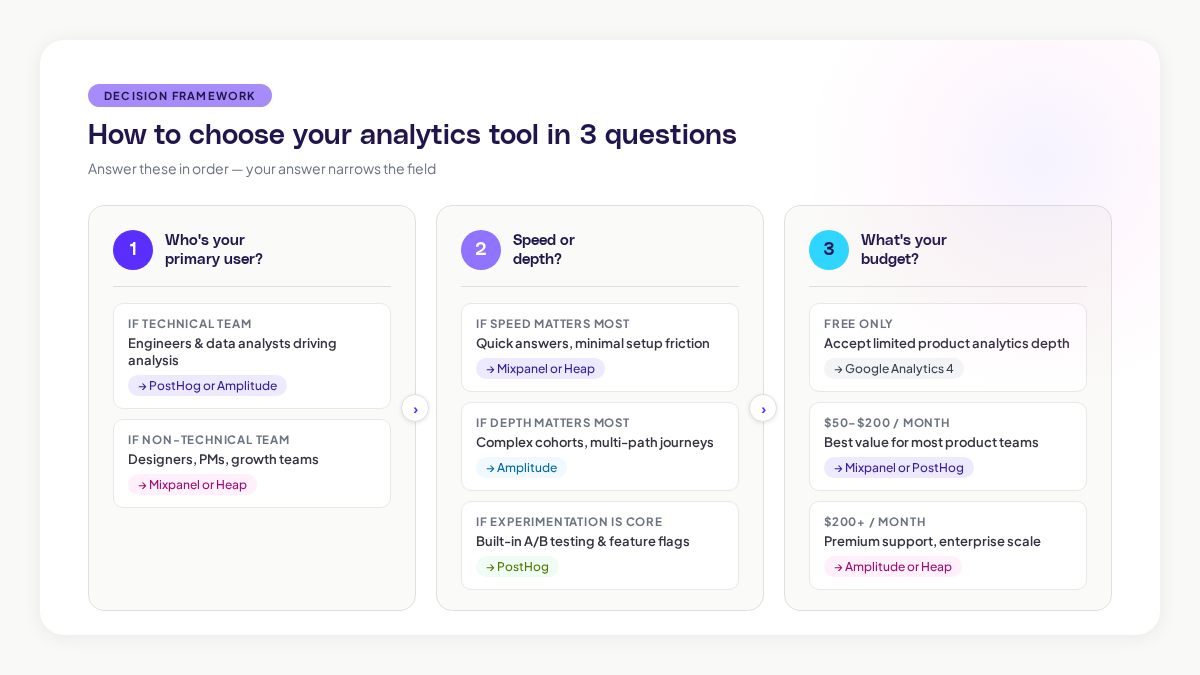
Stop overthinking this. Answer three questions:
Question 1: Who's your primary user? Technical team or non-technical? Designers and PMs, or data analysts? Technical teams unlock PostHog's value. Non-technical teams thrive with Mixpanel or Heap.
Question 2: What's your priority, speed or depth? Need quick answers with minimal setup? Mixpanel or Heap. Need deep cohort analysis and complex journeys? Amplitude. Building experiments into your analytics? PostHog.
Question 3: What's your budget? Free only? Google Analytics, but accept its limitations. $50-200/month? Mixpanel or PostHog. $200+/month? Amplitude or Heap if you need premium support.
The piece these tools miss: context and correlation
Here's what you're not getting from any of these tools alone. You've got event data, you've got cohort breakdowns, you've got funnels. But you don't see the full picture of your product experience.
You're missing the visual context. You know event X dropped 15% this week, but you don't know what changed on your screen that caused it. This is where session replay and visual product intelligence come in, tools that automatically capture every screen, variation, and journey so you can correlate analytics signals with actual product changes.
Tools like Adora bridge this gap by automatically mapping every screen and detecting which product changes correlate with behavioral shifts. When your analytics flag a drop, you see exactly what happened on your product at that moment.
You might use Amplitude for deep analysis, but layer Adora's Screens to see the design context. The best teams aren't loyal to one platform, they combine tools to fill each other's blind spots.
A note on privacy and compliance in 2026
Your choice of analytics tool has real privacy implications. GA4's Consent Mode v2 now delays tracking until consent is granted. PostHog lets you host data yourself. Heap and Mixpanel are cloud-hosted and subject to data residency rules.
If your users are in Europe or you handle sensitive data, this matters. Check your platform's compliance certifications before you commit.
Making your decision
You don't need the perfect tool. You need the tool that fits your team's workflow and constraints.
Start with what you're trying to learn. Are you onboarding new users or are you optimizing existing features? Do you need to understand acquisition or retention? Your answer shapes which platform serves you.
Then consider your team. Non-technical product teams move fast with Mixpanel. Technical teams get the most from PostHog or Amplitude. Teams that want pure analytics alongside other insights benefit from a modular approach.
The tool you pick today probably isn't the tool you'll use in two years. Your needs change as you grow. Start somewhere, learn what your team actually needs, and adjust.
Related posts

Why We Built AI Product Insights
The story behind Adora's AI Insights, and why I think this is the future of how product teams operate.

Data-driven off a cliff: why dashboards are dead
Dashboards are dead. Not because data doesn't matter. But because the way we've been accessing it was never actually built for the people making product decisions. Here's what went wrong, and what comes next.

SaaS Pricing Pages to Sign Up Journeys
This teardown analyzes SaaS pricing pages and their connected sign up journeys. Learn how leading SaaS companies design pricing, CTAs, and sign up flows that reduce friction and increase conversion.